An AI app with 1,000 users does not automatically need a $1,000 monthly AI budget. In a well-designed Retrieval-Augmented Generation (RAG) application, the model is only one part of the bill.
The real cost depends on how often users interact with the app, how much text each request processes, which model you choose, and how efficiently you retrieve information. If you are building your first AI application, understanding these costs early can save you from expensive surprises after launch.
1. Build the Full Cost Stack
A RAG app answers questions using your own documents. A typical version might use Python or Node.js for the backend, OpenAI for text generation and embeddings, PostgreSQL with pgvector for document search, and a VPS or cloud service for hosting.
Here are the main cost categories:
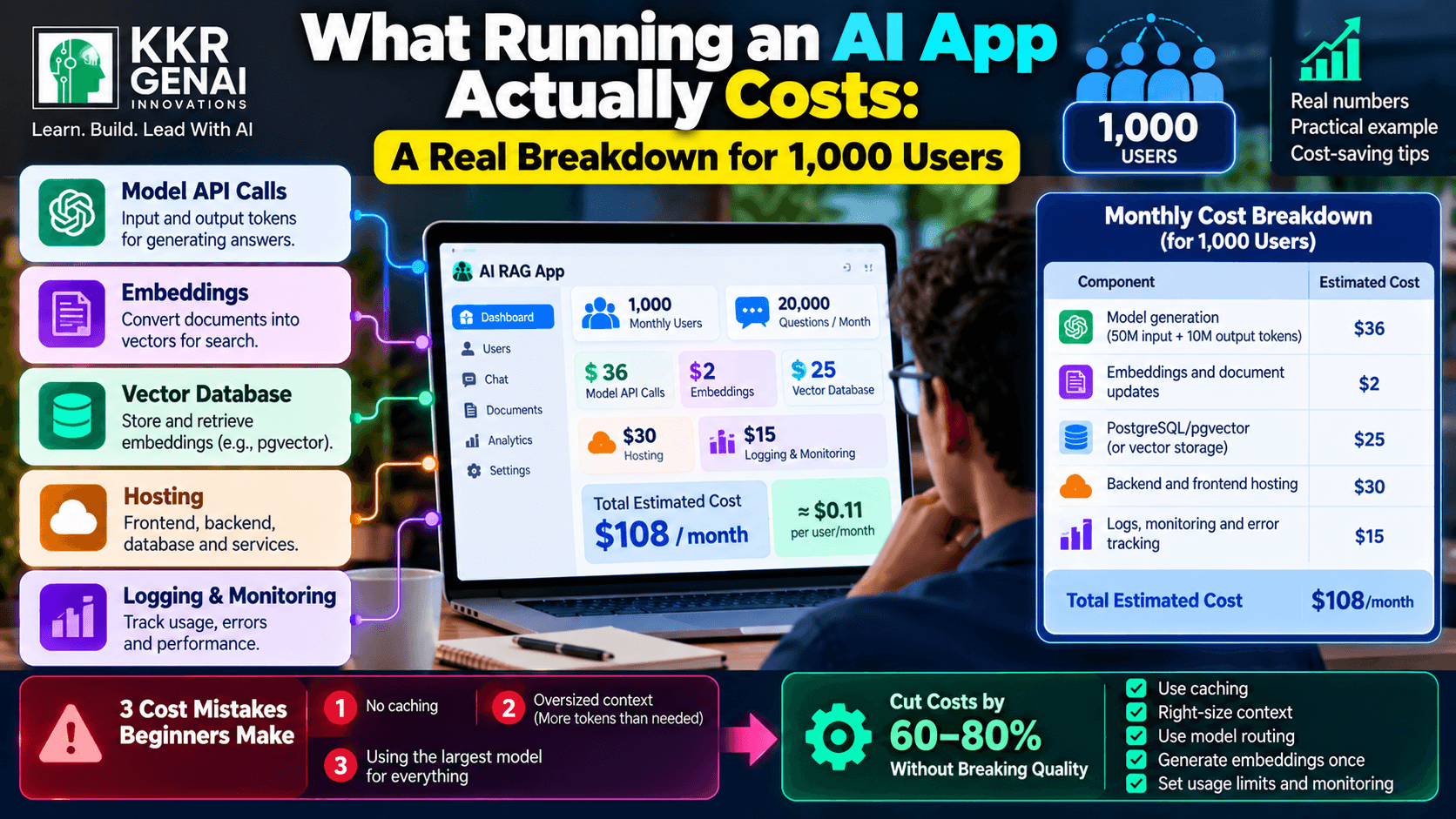
- Model API calls: The largest variable cost in many applications. You pay for input tokens (instructions, user questions, and retrieved text) and output tokens (the generated answer).
- Embeddings: Convert documents and questions into numerical representations for similarity search. Document embeddings are usually generated during ingestion; query embeddings are generated as users ask questions.
- Vector database: Stores embeddings and retrieves relevant document chunks. PostgreSQL with pgvector can avoid a separate vector-database bill when your existing database has enough capacity.
- Hosting: Runs your frontend, backend, database, and background jobs.
- Logging and monitoring: Records errors, latency, token usage, and failed retrievals. Tools such as Sentry, OpenTelemetry, and Grafana can help you find problems before users report them.
The cost of these components depends on your architecture and usage. For reference, OpenAI lists GPT-4.1 mini at $0.40 per million input tokens and $1.60 per million output tokens, while Supabase Pro starts at $25 per month. Verify current pricing before deployment.
2. A Realistic Monthly Estimate for 1,000 Users
Let's build a concrete example for a small business knowledge-base assistant.
Assume 1,000 monthly active users, each sending 20 questions per month. That gives you 20,000 questions per month. For each question, assume 2,500 input tokens—including the question, instructions, and retrieved context—and 500 output tokens.
Using GPT-4.1 mini pricing as the example, the calculation is:
- Input: 20,000 × 2,500 = 50 million tokens. At $0.40 per million, that costs $20.
- Output: 20,000 × 500 = 10 million tokens. At $1.60 per million, that costs $16.
- Total model generation: $36 per month, before retries, other model calls, or additional tools.
Now add a practical infrastructure budget. These are planning estimates, not fixed vendor quotes.
| Component | Estimated monthly cost |
|---|---|
| Model generation | $36 |
| Embeddings and document updates | $2 |
| PostgreSQL/pgvector or vector storage allowance | $25 |
| Backend and frontend hosting | $30 |
| Logs, monitoring, and error tracking | $15 |
| Estimated total | $108/month |
That is approximately $0.11 per active user per month at this usage level. Your actual bill could be higher if you need dedicated database resources, backups, stronger availability, larger document collections, or extensive monitoring.
The model calculation is based on published token prices; the other figures are illustrative allowances. For example, a managed vector database can change the total depending on its plan, storage, and usage requirements.
3. Three Cost Mistakes Beginners Make
Mistake 1: No caching. If users repeatedly ask the same questions, your application may call the model every time. Cache answers for suitable repeated queries, or cache intermediate results when the underlying documents have not changed. Always invalidate cached answers when the source information changes.
Mistake 2: Oversized context. Sending 15,000 tokens of retrieved documents when 2,500 relevant tokens would work increases input processing and can distract the model with irrelevant details. Use sensible chunk sizes, retrieve a small number of relevant chunks, and measure answer quality instead of maximizing context length.
Mistake 3: Using the largest model for everything. A simple classification or query-rewriting task may not need the same model as a difficult reasoning task. Route straightforward requests to a smaller model and escalate only when evaluation shows that a more capable model improves the result.
4. How to Cut Costs by 60–80% Without Breaking Quality
Start by measuring your baseline: cost per question, average input and output tokens, cache-hit rate, and answer quality on a fixed test set. Without measurements, you may cut spending while quietly damaging the answers.
Next, combine several improvements:
- Cache repeated work. If 30% of requests can be served from a valid cache, you can avoid model calls for that portion.
- Reduce unnecessary context. If input tokens fall by 50%, the input portion of the model bill falls by roughly 50%, assuming the same model and pricing.
- Use model routing. Let a cheaper model handle routine questions while sending difficult requests to a stronger model.
- Generate embeddings once. Re-embed only changed or newly added documents rather than rebuilding the entire index.
- Set usage limits. Add per-user rate limits, maximum output tokens, retry limits, and alerts when daily spending exceeds your budget.
These savings compound, but they are not guaranteed. A 60–80% reduction is a reasonable optimization target to test—not a promise for every application. Check accuracy, retrieval quality, and user satisfaction after each change.
5. Budget for Usage, Not Just User Count
Two applications can each have 1,000 users and very different bills. One might answer 20 short questions per person each month; another might process long documents, call multiple models, and generate lengthy responses.
Build a cost dashboard before launch. Track monthly active users, questions per user, tokens per question, hosting expenses, and cost per successful answer. Set a spending alert and test a busy day before opening the app to more users.
If you already run a VPS and PostgreSQL, reuse that infrastructure where practical, but don't ignore backups, security, resource limits, or reliability. The goal is not simply the lowest bill; it is the lowest cost that still delivers accurate answers and a dependable service.
What did you assume this cost before reading — higher or lower?
Join the KKRGENAI community discussion to compare estimates, share your architecture, and learn how other builders control AI application costs.