Before Model Context Protocol (MCP), connecting an AI assistant to each external tool often meant writing custom integration code for that particular application. MCP gives developers a common protocol, so compatible assistants and tools can communicate through a shared interface.
The idea is similar to USB-C: one standard can make connections simpler, but it does not mean every connected device supports every possible feature. Understanding that distinction will help you build more maintainable AI applications.
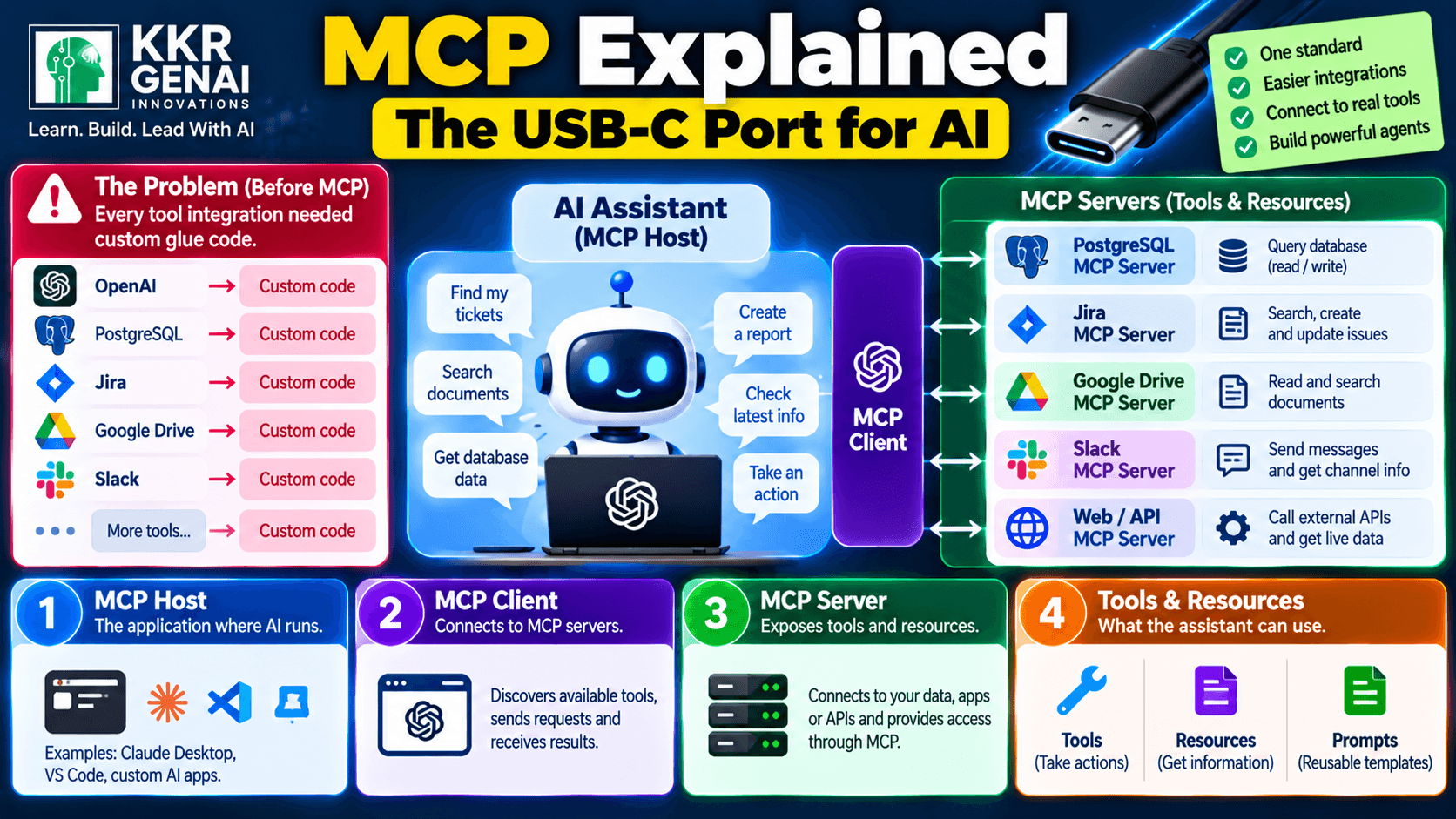
1. The Problem: Every Integration Needed Its Own Glue Code
Imagine you are building an AI assistant for a support team. It needs to search PostgreSQL for customer records, read documentation, check Jira tickets, and retrieve information from internal APIs.
Without a shared integration protocol, developers may need separate code to connect each tool, describe its available actions, manage authentication, and convert results into a format the model can use. When the application grows, maintaining these connections can become a project of its own.
Now imagine adding another assistant or replacing the model provider. Depending on how the original integrations were designed, you may need to adapt substantial amounts of glue code just to preserve the same capabilities.
MCP addresses this integration problem by defining a common way for AI applications to discover and interact with external capabilities. Instead of inventing a new interface for every connection, developers can implement MCP-compatible clients and servers.
2. MCP Is Like USB-C for AI Tools
USB-C provides a standardized physical connector, but the actual capabilities depend on the devices, supported protocols, and negotiated features. MCP plays a comparable role at the software level: it defines how an AI application communicates with services that expose information and actions.
For example, an MCP-compatible assistant could connect to a server that provides access to your company's documentation. Another compatible client could use that same server without requiring an entirely new, custom integration for the documentation system.
MCP does not automatically make every application compatible, and it does not remove the need for authentication, permissions, or security checks. The server must expose capabilities through MCP, and the client must know how to connect to and use them.
The key benefit is a more reusable integration boundary. Developers can focus on what a tool does rather than repeatedly designing how an AI application should communicate with it.
3. Understand the Four Main Parts
1. MCP host: The application in which the AI experience runs. An AI desktop application or coding assistant can act as the host, coordinating the model, user interaction, and MCP connections.
2. MCP client: The component inside the host that maintains a connection with an MCP server. A host can use multiple clients to connect to different servers.
3. MCP server: A program that exposes capabilities through the protocol. It might connect to a filesystem, database, documentation source, or an external service such as Jira.
4. Tools and resources: Tools are actions the model can request, such as searching tickets or creating a draft issue. Resources provide information the client can access, such as documentation, configuration details, or database records exposed by the server.
MCP also supports prompts, which allow servers to offer reusable prompt templates. The host and client coordinate the interaction, while the server determines which capabilities it exposes and how those capabilities are implemented.
This separation matters because an MCP server does not have to contain the AI model itself. It can simply expose a controlled interface to an existing system, allowing the assistant to use that system when appropriate.
4. A Real Example: Connect One Server to an Assistant
Suppose your team has 500 Jira issues and wants to ask, “Which unresolved bugs are related to payment failures, and what should we investigate first?” You could build an MCP server that exposes a read-only Jira search tool.
Here is how the interaction could work:
- Connect: The MCP client establishes a connection with the Jira MCP server and discovers the tools it supports.
- Ask: The user asks the assistant to find unresolved payment-related bugs.
- Choose a tool: The model determines that the available Jira search tool is relevant and requests its use.
- Execute: The host or client coordinates the tool call, and the server queries Jira using the configured permissions.
- Return results: The server sends the matching issue details back through MCP, and the assistant summarizes the findings.
The assistant might identify 12 matching issues, group them by error type, and highlight the oldest unresolved bugs. The exact number depends on the actual Jira data; the important point is that the assistant can work with live information instead of relying only on text supplied in the conversation.
You could later connect another MCP server for PostgreSQL or internal documentation. The assistant could then combine permitted information from multiple sources, provided the host, model, and servers support the required workflow.
5. Why MCP Matters for the Next Generation of AI Agents
AI agents become more useful when they can access external information and take controlled actions. MCP provides a standardized integration option for those capabilities, which can reduce duplicated connector work across compatible applications.
If you come from QA, Salesforce, data engineering, or technical support, you already understand many of the underlying ideas: APIs, authentication, data permissions, error handling, and system integration. MCP gives you another practical way to apply those skills to AI engineering.
A good starter project is a read-only documentation or database assistant. Build a small MCP server, expose one or two carefully scoped tools, connect it to a compatible client, and test what happens when the server returns empty results, malformed data, or an error.
Security must be part of the design. Limit the server's permissions, validate tool inputs, protect credentials, and require confirmation for consequential actions such as deleting records, sending external messages, or changing production data. Treat tool results as data to verify, not as instructions that automatically deserve trust.
MCP will not eliminate every integration challenge, and it does not guarantee that an agent will make correct decisions. Its practical value is simpler, more consistent communication between AI applications and the systems they are allowed to use.
What is the first thing you would connect if you set this up today?
Join the KKRGENAI community discussion to share your first MCP integration idea and learn how other AI builders are connecting tools to assistants.