An AI agent can call tools, inspect the results, and decide what to do next. But a chatbot that writes a perfect answer is not automatically an agent.
The difference matters if you want to build AI applications or move from a traditional IT role into AI engineering. Understanding what an agent actually does is more useful than memorizing another AI buzzword.
1. The Four Parts of an AI Agent
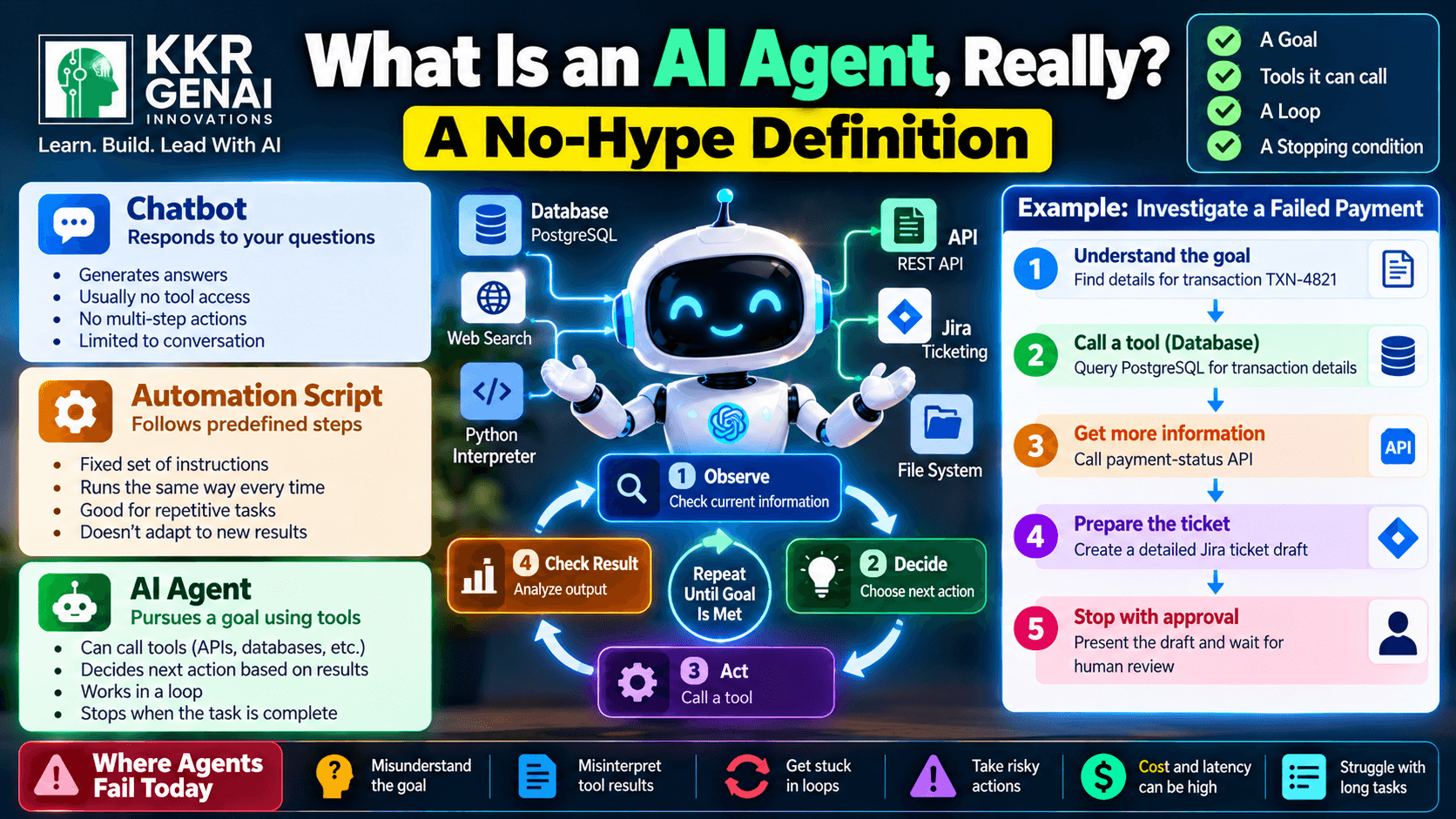
An AI agent is a system that works toward a goal, uses available tools, repeats a decision-and-action process, and stops when a defined condition is met.
Think of it as four connected parts.
1. A goal. The agent receives a task it needs to complete. For example, “Find the three most recent failed payment transactions, identify their error messages, and prepare a summary.”
2. Tools it can call. Tools allow the agent to interact with other systems. These might include a PostgreSQL database, a Python interpreter, a REST API, a web browser, or a ticketing system such as Jira.
3. A loop. The agent observes the available information, decides on an action, calls a tool, checks the result, and decides what to do next. It may repeat this process several times rather than following one fixed sequence.
4. A stopping condition. The agent needs a rule for when to finish. It might stop when the requested task is complete, when it reaches a maximum number of steps, when a required tool fails repeatedly, or when human approval is needed.
Remove the goal, and there is no clear purpose. Remove the tools, and the system may be limited to generating text. Remove the loop, and it cannot adapt its next action to what happened previously. Remove the stopping condition, and it risks wasting time, tokens, and money.
2. How an Agent Differs From a Chatbot or Script
These three systems can use the same language model and still behave very differently.
A chatbot primarily responds to a user's message. You ask, “Why did this payment fail?” and it explains possible reasons. Unless it has tools and permission to use them, it cannot inspect your actual payment records.
A plain automation script follows predefined instructions. For example, a Python script queries a database, filters failed payments, and generates a CSV file. It can perform the task reliably, but its next step is generally determined by the code rather than a model deciding what to do based on each new result.
An AI agent can choose its next action based on what it observes. It might query PostgreSQL, discover that an error code is unfamiliar, call an internal API for additional details, and then prepare a more accurate report.
| Capability | Chatbot | Automation script | AI agent |
|---|---|---|---|
| Main behavior | Responds | Follows coded steps | Pursues a goal |
| Uses external tools | Not necessarily | Yes, as programmed | Yes, when available |
| Adapts to new results | Usually limited | Only as coded | Can choose a different next action |
| Predictability | Depends on model and setup | Usually high | Depends on model, tools, and constraints |
An agent is not automatically better than a script. If a task has stable rules and predictable inputs, ordinary automation is often cheaper, faster, and easier to test. An agent becomes useful when the next action depends on information that is not fully known in advance.
3. One Agent, One Task: Every Loop Explained
Imagine a support team wants an AI agent to investigate a failed customer payment and prepare a Jira ticket. The agent has access to read-only PostgreSQL queries, an internal payment-status API, and a Jira ticket-creation tool.
The task is: “Investigate transaction TXN-4821 and prepare a ticket explaining the likely cause.”
Loop 1 — Understand the goal. The model identifies the required information: transaction status, error details, and a useful summary. It decides to query PostgreSQL first.
Action: The agent calls a database tool with a restricted query for transaction TXN-4821.
Observation: PostgreSQL returns a failed status and error code PAYMENT_TIMEOUT. The record does not establish whether the payment provider received the request.
Loop 2 — Gather more evidence. Instead of guessing, the agent decides to call the internal payment-status API with the transaction ID.
Action: The API returns a timeout response and indicates that the provider's final status is unknown.
Observation: The agent now has additional evidence, but it still cannot confirm whether the customer was charged.
Loop 3 — Prepare the ticket. The agent combines the database record and API response. It drafts a Jira ticket describing the timeout, the unknown final payment status, the evidence collected, and the recommended next investigation step.
Action: Before creating the ticket, the system checks its authorization rules. In this example, it requires a human to approve the ticket because the investigation is incomplete.
Loop 4 — Stop safely. The agent presents the draft and explains why it needs approval. It does not claim that the payment was definitively unsuccessful or that the ticket has already been created.
This example shows the essential pattern: goal → action → observation → next decision. The stopping condition is reached when the draft is ready and the approval requirement is triggered.
Notice that the agent did not need to perform every possible action. A well-designed agent stops when it has enough evidence for the permitted outcome—or when it reaches a boundary that requires human judgment.
4. Where AI Agents Genuinely Fail Today
Agents can make mistakes even when their tools work correctly.
They can misunderstand the goal. “Fix the payment issue” is ambiguous. Should the system investigate, retry the transaction, refund the customer, or contact the provider? A vague goal can lead to an incorrect action.
They can misinterpret tool results. A model may treat an incomplete API response as proof, confuse two similar records, or invent a reason for an error. Tool access provides evidence, not guaranteed understanding.
They can get stuck in loops. An agent might repeat a failed API request, retry an unsuccessful search, or keep generating slightly different plans. Limits on iterations, execution time, and spending are essential.
They can take risky actions. Updating a database, sending an email, issuing a refund, or closing a support ticket can have real consequences. Permission checks, read-only access where possible, approval gates, and audit logs reduce the risk.
They can fail on long tasks. As a task grows, earlier details may be lost or misremembered, tool calls may fail, and small errors can accumulate. Agents also introduce latency and cost because they may need multiple model calls and tool executions for one task.
This is why production systems need more than a capable model. They need reliable APIs, carefully limited permissions, validation, logging, retry policies, evaluation tests, and clear rules for handing work to a person.
5. What This Means for Your AI Engineering Career
If you come from Salesforce, QA, data engineering, testing, or technical support, you already understand several parts of agent development.
You know how APIs exchange data, why database permissions matter, how to reproduce failures, and why logs are important. Those skills transfer directly into building and testing tool-using AI systems.
A practical starter project is a support-ticket investigation agent. Use Python, an LLM with tool-calling support, PostgreSQL, and a Jira test project. Start with read-only investigation, record every tool call, test incorrect inputs, and add human approval before allowing the agent to make changes.
Measure more than whether the final answer sounds convincing. Track task completion rate, tool-call accuracy, failure recovery, average execution time, and cost per completed task. Compare the agent with a simple script to see whether the extra complexity delivers measurable value.
You do not need to build a fully autonomous system first. A small agent that completes one clearly defined task safely is a better engineering project than a complicated agent that cannot be evaluated.
Define an AI agent in your own words — one sentence, no buzzwords.
Join the KKRGENAI community discussion and share your definition, examples, and questions with fellow AI learners.